You already know what cursed text looks like. You have seen the dripping letters in a Discord username, the corrupted bio on someone’s TikTok profile, the message in a group chat that made everyone stop and ask how it was even possible to type that. What you might not know is how those tools actually work behind the scenes, what separates a good cursed writing generator from a weak one, and which features actually matter when you are picking a tool to use.
That is what this guide covers. Not the symbols themselves, our cursed Unicode symbols guide already breaks down exactly which Unicode characters create which visual effects. This article is about the generators themselves, how they function, what makes one better than another, and how to actually use one to get the result you want on the first try.
What Is a Cursed Writing Generator?
A cursed writing generator is a tool, almost always browser-based, that takes whatever text you type and converts it into a distorted, corrupted-looking version using Unicode combining diacritical marks. You type a normal sentence. The tool processes it character by character, attaching multiple combining marks to each letter. What comes out the other end looks broken, haunted, or glitched, depending on the settings you chose.
The important thing to understand is that the generator is not creating new characters out of nowhere. It is selecting from an existing, standardized set of Unicode symbols and stacking them in combinations that would take a person hours to assemble by hand. A standard keyboard cannot access these symbols directly, which is exactly why a generator exists in the first place, it automates something that is technically possible but practically impossible to do manually at any reasonable speed.
How These Tools Actually Work Under the Hood
Every cursed writing generator follows roughly the same three-step process, even if the interface looks different from one tool to another.
First, the tool reads your input text one character at a time. Second, for each character, it selects a set of combining marks from the Unicode standard’s diacritical marks block and attaches them to that character. Third, it renders the combined result and displays it back to you instantly, usually updating live as you type rather than waiting for you to click a submit button.
The intensity setting you choose controls how many combining marks get attached per letter. A low setting might apply two or three marks. A high setting can apply dozens. Some tools also let you control the direction of distortion separately, whether the marks stack mostly above the letter, mostly below it, or some mix of both plus marks that strike through the middle. This is where generators start to differ from each other in meaningful ways, since not every tool gives you that level of control.
What Separates a Good Generator From a Weak One
This is the part most comparison articles skip, but it matters if you are actually trying to get a usable result rather than just messing around for thirty seconds.
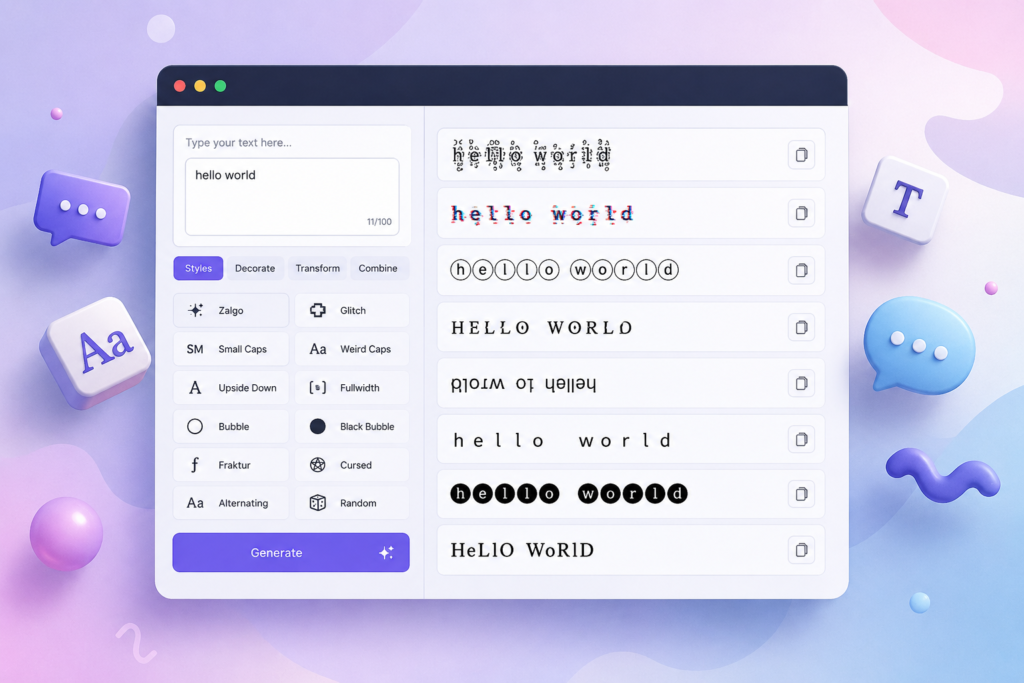
Real-time preview matters more than people expect. A generator that only shows output after you click a button forces you to guess at intensity, copy, paste, check how it looks, and repeat the whole process if it is wrong. A tool that updates the distorted text live as you type lets you dial in the exact look you want before you ever copy anything.
Multiple distortion styles in one place save real time. Some generators only produce one flavor of distorted text, usually heavy Zalgo-style chaos. Better tools offer separate styles for lighter glitch effects, heavier void-style distortion, and even alternate character substitution that does not rely on combining marks at all. Having all three available without switching websites is a genuine convenience difference, not just a nice-to-have.
Copy functionality that actually works across devices. This sounds basic, but a surprising number of generators built years ago do not handle mobile copy-paste correctly, especially on iOS Safari. A generator built and maintained recently tends to handle this far more reliably.
No degraded free tier. Some tools gate the more dramatic distortion levels behind a paywall, giving you only mild output unless you pay. A generator worth using gives you full access to every intensity level without restrictions.
If you want to compare a fully featured option directly, our free cursed text generator covers glitch, Zalgo, and weird Unicode styles in one interface with live preview and no paywalled features.
The Three Main Categories of Output You Will Find
Not every cursed writing generator produces the same kind of weirdness. Broadly, the tools out there fall into three categories based on the technique they use.
Combining mark generators are the most common type and the ones that produce the classic dripping, corrupted look most people think of first. These stack Unicode combining diacritical marks above, below, and through your base letters. Our Zalgo text generator is built specifically around this technique at full intensity, while a lighter setting on the same underlying method produces the more readable glitch-style effect rather than the maximum chaos version.
Character substitution generators work completely differently. Instead of stacking marks onto your existing letters, they swap each letter for a different Unicode character that visually resembles it but comes from an entirely separate part of the Unicode standard, mathematical alphanumeric symbols, alternate script characters, or stylized lookalikes. This produces text that looks unusual and foreign without the dripping or overflow effect, which makes it a better fit for bios and profiles where you want something distinctive but still fully legible.
Heavy atmospheric generators push combining marks to their absolute maximum, producing text that prioritizes mood over readability entirely. This is the category most associated with the term void text, distortion so dense that individual letters become difficult to identify without already knowing what word you are looking at. Our void text generator is built around this specific use case, and it is worth checking out separately if a heavy atmosphere is what you are actually after rather than a readable username.
Practical Use Cases Where the Right Tool Matters
The generator you pick should depend heavily on where you are actually putting the text, because different platforms handle Unicode combining marks differently.
If you are building out a username, you generally want a lighter touch. Heavy distortion in a name field can get flagged or simply render poorly in a small UI element where space is limited. Our dedicated guide on Roblox usernames covers exactly how that platform handles different intensity levels, since Roblox is noticeably stricter about character limits than most other platforms.
Discord, by contrast, is one of the more forgiving platforms when it comes to heavy distortion, particularly in bios and status messages rather than the display name field itself. Our Discord-focused guide walks through which fields tolerate heavy Zalgo-style output and which ones you should keep lighter.
If you do not want to generate anything custom at all and just want something ready to paste immediately, a pre-made library skips the generator step entirely. Our cursed text copy paste collection has a large set of names, bios, and phrases already converted and ready to use without typing anything into a tool first.
And if you are working from a phone rather than a desktop, our cursed keyboard guide covers the specific steps for generating and copying this kind of text on iPhone and Android, since mobile copy-paste behavior is not always identical to desktop.
Common Mistakes People Make With These Tools
A few patterns show up consistently among people who are new to this kind of generator.
The most common one is maxing out the intensity setting immediately because it looks the most dramatic in a preview window, then being surprised when the text becomes completely unreadable once pasted somewhere with limited space, like a username field. Starting at a lower setting and increasing gradually almost always produces a better practical result.
Another frequent issue is assuming every platform renders the output identically. It does not. The exact same generated string can look slightly different on an iPhone versus an Android device versus a desktop browser, because each platform’s font rendering engine handles combining marks with small variations. This is not a flaw in the generator, it is just how font rendering works across different operating systems.
People also sometimes assume heavier distortion always reads as scarier or cooler. In practice, a moderate amount of distortion that stays legible often gets a stronger reaction than an unreadable wall of symbols, simply because the viewer can actually process what they are looking at and recognize the effort behind it.
Pick the Right Tool and the Right Setting
A cursed writing generator is only as useful as your understanding of what it is actually doing. Now that you know the mechanics, combining marks versus character substitution, why intensity settings matter, and why the same text can look different depending on where you paste it, picking the right tool for your specific situation becomes a lot easier than guessing.
Start with a lighter setting if legibility matters, go heavier if mood is the entire point, and match the platform you are using to a tool that handles that specific context well.
Free. Unlimited. No sign-up required. Try the full range of styles at Cursed Text Creater right now.
Frequently Asked Questions
Is a cursed writing generator the same as a font?
No. A generator does not install or apply a custom font. It uses standard Unicode characters already supported by every modern device, which is exactly why the output pastes correctly into apps and websites without requiring the other person to have anything special installed.
Can I adjust how intense the distortion looks?
Yes, on any well-built generator. Intensity settings control how many combining marks get applied to each letter, ranging from a light touch that stays fully readable to maximum distortion where individual characters become difficult to identify.
Why does the same generated text look different when I paste it somewhere else?
Different platforms and devices use different font rendering engines, and combining marks are handled with slight variation between them. The underlying characters are identical, only the visual rendering changes slightly from one app or device to another.
Do I need to download anything to use one of these tools?
No. The vast majority of cursed writing generators run entirely in your browser, with nothing to install on your phone or computer. You type, the tool converts it instantly, and you copy the result directly.
Is it safe to use cursed text generated by these tools?
Yes. The output is made entirely of standard, valid Unicode characters with no hidden code or scripts attached. There is no security risk in generating, copying, or pasting this kind of text anywhere.