Cursed Text Generator for Roblox — Glitch Font Names

glitch text generator roblox username cursed font

Roblox has over 380 million registered accounts. Standing out on a platform that massive starts with one thing every other player sees before anything else — your username. Plain text names disappear into the crowd instantly. A glitched, corrupted username does the opposite. It stops people scrolling through a friends list. It carries weight in a game lobby. It signals that you put actual thought into your identity on the platform.

That is exactly what a cursed text generator for Roblox produces — usernames and profile text built from glitch font characters that look broken, haunted, or digitally corrupted while remaining completely safe and within Roblox’s rules.

This guide covers what cursed text actually is, why it works differently in Roblox usernames versus bios, how the generator creates it, and exactly how to get your own glitch font name on Roblox in under a minute.

What Is Cursed Text for Roblox?

Cursed text for Roblox is any username, display name, or bio text that uses Unicode combining diacritical marks to create a visually distorted, corrupted appearance. Instead of plain readable letters, the text looks like it is dripping with symbols or glitching at the character level.

The Unicode standard — maintained by the Unicode Consortium — defines every character used on every device, including Roblox’s client on PC, mobile, and console. Within Unicode there is a block called combining diacritical marks, covering code points U+0300 through U+036F. These 112 characters were originally designed for legitimate language purposes — adding accents to letters, like the umlaut in über or the tilde in mañana.

Cursed text generators stack these marks far beyond their intended use. Apply enough above and below a single letter and the character visually overflows its line boundaries — bleeding upward, dripping downward, looking corrupted in exactly the way glitch font aesthetics are meant to look.

Because every character remains standard Unicode throughout, cursed text copies and pastes correctly into Roblox on every device — PC, mobile, Xbox — since the Roblox client renders Unicode the same way across all of them.

Does Cursed Text Actually Work on Roblox?

This is the most important question for anyone trying to get a glitch font name on the platform — and the honest answer depends entirely on which Roblox field you are using.

Roblox Username — This is your permanent unique handle created at signup. Roblox applies character filtering during account creation that restricts certain Unicode combining characters. Very heavy distortion — maximum Zalgo-style stacking — typically gets rejected. Light intensity glitch text with minimal combining marks passes in many cases. The Roblox community has found that one or two light combining marks per letter often clears the filter while still producing a noticeably distorted look.

Roblox Display Name — Some Roblox accounts have a separate display name that can differ from the permanent username. Display names tend to have somewhat more flexibility with Unicode characters than the original username field, though they still pass through filtering.

Roblox Profile Bio (About section) — This is where cursed text has the most freedom on the platform. Roblox bios support a significantly wider range of Unicode characters compared to usernames. Medium to heavy Zalgo-style distortion typically displays without issue in the bio field. This is the best place on Roblox to use maximum intensity cursed text.

Roblox Group Names — If you create or manage a Roblox group, group names face similar restrictions to usernames. Light intensity is the safest approach.

Roblox Group Descriptions — Like profile bios, group descriptions allow more Unicode flexibility than names. Heavier distortion works well here.

Roblox Studio (for developers) — If you build Roblox games, you can apply glitch font text directly inside TextLabel and TextButton properties in Roblox Studio. Because this is content you control entirely as a developer rather than something passing through account-level filtering, you have full freedom to use any intensity of cursed text in your game’s UI, signage, and dialogue.

Glitch Text vs. Zalgo Text vs. Void Text for Roblox

These three terms describe different intensity levels of the same Unicode technique, and knowing which one fits Roblox’s specific restrictions matters.

Glitch Text is the lightest style — moderate combining mark stacking that produces visibly corrupted text while staying readable. This is the style that works best for Roblox usernames specifically, because the lighter stacking is more likely to pass through the platform’s character filtering during account creation while still giving your name a distinctly different look from every plain text username in a server.

Zalgo Text is the maximum intensity version, named after a 2004 internet creepypasta character that originated on Something Awful and 4chan’s /x/ paranormal board. Zalgo stacks combining marks so densely that letters become buried under layers of symbols. This style is too heavy for most Roblox usernames but works extremely well in profile bios and group descriptions where filtering is more permissive. Our dedicated Zalgo text generator handles this style specifically if you want maximum distortion for your Roblox bio.

Void Text is an alternative name for heavy Zalgo-style distortion that gained popularity specifically within gaming communities — Roblox players are among the heaviest users of this terminology. Technically identical to maximum Zalgo text. Our void text generator covers this style in complete detail if the void aesthetic specifically is what you are after for your Roblox bio.

For Roblox specifically: use Glitch Text for your username, and save Zalgo or Void Text for your bio where the platform allows heavier distortion.

How to Generate Cursed Text for Roblox — Step by Step

Getting your glitch font Roblox name takes under a minute using a free browser-based generator — no apps, no downloads, nothing that could violate Roblox’s terms of service.

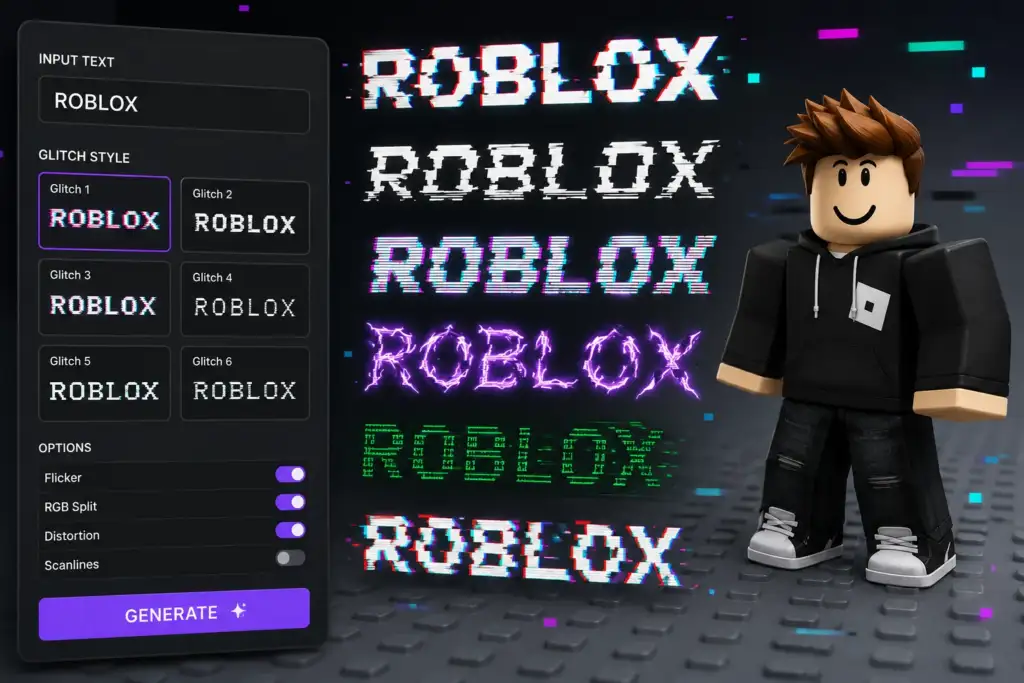
Step 1 — Open Cursed Text Creater in any browser on your phone, tablet, or computer.

Step 2 — Type your desired Roblox username idea into the input field.

Step 3 — Select Glitch Text for username attempts, since lighter intensity passes Roblox’s character filter more reliably. Select Zalgo or Void Text if generating text for your bio instead.

Step 4 — Your cursed text generates in real time as you type — no submit button, no loading screen.

Step 5 — Click or tap Copy on the output you want.

Step 6 — For usernames: paste during the Roblox account creation or change process and see if it passes the filter. If rejected, return to the generator and reduce intensity. For bios: open your Roblox profile settings and paste directly into the About section.

Step 7 — If your first attempt does not pass, do not give up — light glitch text with just one or two combining marks per letter has a meaningfully higher success rate. Iterate until you find a version that clears the filter.

For the full free generator covering all three cursed text styles, our cursed text generator is the central tool for everything covered here.

25 Cursed Username Ideas for Roblox

Not sure what to glitch? Here are popular Roblox username concepts organized by category. Run any of these through the generator at light intensity for the best chance of passing Roblox’s username filter.

Horror and Mystery Names

  • ShadowVoid
  • LostSoul
  • DeadPixel
  • VoidWalker
  • BrokenReality
  • NullZone
  • DarkSignal
  • HauntedByte
  • GlitchedGhost
  • CursedEntity

Gaming and Competitive Names

  • PhantomStrike
  • GlitchKing
  • CorruptedAce
  • ErrorCode
  • SystemCrash
  • NullPointer
  • DeadServer
  • GhostProtocol
  • CrashOverride
  • VoidSniper

Mysterious and Aesthetic Names

  • LostInStatic
  • SignalLost
  • EmptyFrequency
  • QuantumGlitch
  • MirrorCracked

Why Glitch Font Names Matter on Roblox

Roblox’s player base in the United States is heavily concentrated among teens and pre-teens — a demographic that places significant value on standing out within the games they play. Your username is visible to every other player, every friend, and every group you join. It is the single most persistent piece of identity you carry across the platform.

A glitch font name signals something specific within Roblox’s gaming culture: that you understand and participate in the broader internet aesthetic of corrupted text and digital horror that spans Discord, TikTok, and gaming communities generally. Players with glitched usernames are often perceived as more connected to broader gaming and internet culture than players with default plain names.

Beyond usernames specifically, the same glitch font aesthetic extends into other parts of Roblox. Horror genre games on the platform use cursed text extensively in their UI, item names, and signage to build atmosphere. If you are a Roblox developer working in horror, the same Unicode techniques apply directly to your game’s text elements through Roblox Studio.

For deeper context on where this aesthetic originated, our complete guide to cursed text, glitch and Zalgo Unicode covers the full history from 2004 through today.

If Discord is part of your gaming setup — and for most Roblox players in the US it is — our guide on cursed text for Discord covers exactly which Discord fields support which intensity of glitch and Zalgo text.

Get Your Glitch Font Roblox Name Right Now

Every lobby you join. Every friend request you send. Every group you participate in. Your Roblox username is working constantly across the entire platform — and a plain text name blends into a player base of hundreds of millions without leaving any impression at all.

Type your idea. Generate the glitch font version. Test it during Roblox account creation. Adjust intensity if needed. Once it passes, you have a username that nobody else on the platform has.

Free. Unlimited. No sign-up. Works on iPhone, Android, and every desktop browser. Your glitch font Roblox name is ready in under a minute.

Frequently Asked Questions

Does cursed text actually work in Roblox usernames? 

Light intensity glitch text works in many Roblox username attempts, though Roblox’s character filtering can reject combining marks depending on the specific characters used. Testing at the lowest intensity setting and adjusting from there produces the best results. Roblox bios have significantly more flexibility and support heavier distortion reliably.

Is using a cursed text generator against Roblox’s rules? 

No. Cursed text uses completely standard Unicode characters — the same character standard used for every letter, number, and emoji across every platform. It does not involve any modding, hacking, or exploiting of the Roblox client. Using a free browser-based generator to create your username text is fully within Roblox’s terms of service.

What is the best cursed text style for a Roblox username specifically? 

Glitch Text at light intensity is the best choice for Roblox usernames because it has the highest chance of passing the platform’s character validation while still producing a visibly distorted, distinctive look. Zalgo and void text styles work better in your profile bio where Roblox allows more Unicode flexibility.

Can Roblox Studio developers use cursed text in their games? 

Yes. Roblox developers can apply glitch font text directly inside TextLabel and TextButton properties in Roblox Studio for game UI, signage, and dialogue. Since this content is controlled entirely by the developer rather than passing through account-level filtering, any intensity of cursed text — including full Zalgo — works without restriction.

Why did my cursed Roblox username get rejected? 

Roblox applies character filtering during username creation that restricts certain Unicode combining characters, particularly at higher distortion intensities. If your attempt gets rejected, return to the generator, reduce the intensity setting, and try again with lighter distortion until you find a version that passes.

Leave a Comment

Your email address will not be published. Required fields are marked *