Cursed Keyboard: How to Type Cursed Text on iPhone & Android (No App Needed)

Cursed Keyboard: How to Type Cursed Text on iPhone & Android (No App Needed)

You’ve seen it everywhere. A Discord username that looks completely corrupted. A TikTok bio that seems like it came from a horror game. An iMessage that made your entire group chat stop and ask — “how did you type that?”

And your first thought was probably: do they have some kind of special cursed keyboard?

Here’s the truth — there is no cursed keyboard. No special app. No secret keyboard layout. No hidden setting buried in your iPhone or Android. What you’re seeing is Unicode combining text, and the only thing you need to create it is a free online generator and your phone’s copy-paste function.

By the end of this guide you’ll know exactly how to type cursed text on any device — iPhone, Android, laptop, or desktop — in under ten seconds, using our free cursed text generator at Cursed Text Creater.

What People Mean When They Search “Cursed Keyboard”

When someone types “cursed keyboard” into Google, they’re not actually looking for a physical keyboard. They want to know how to type the cursed, glitchy, corrupted text they’ve been seeing all over Discord, TikTok, Instagram, and their group chats.

The confusion makes total sense. When you see text that looks that broken and distorted, your first instinct is to assume the person must have some kind of special tool — a different keyboard app, a hidden font setting, or some custom software most people don’t know about.

But that’s not what’s happening at all.

Cursed text is created by stacking Unicode combining diacritical marks above and below regular letters. These are tiny invisible characters that attach to normal letters and pile up until the text looks corrupted, haunted, or digitally broken. Every single character in cursed text is completely standard Unicode — the same character system that powers every letter, emoji, and symbol on your phone right now.

That’s exactly why cursed text works everywhere. You don’t need a special keyboard. You don’t need a special font. You generate it once, copy it, and paste it into literally any app that accepts text — Discord, iMessage, WhatsApp, TikTok, Instagram, Snapchat, Roblox, anywhere.

Why There’s No Such Thing as a “Cursed Keyboard App”

You might have seen apps in the App Store or Google Play Store that claim to be cursed keyboard apps. Here’s what you need to know before downloading any of them:

Most of these apps either don’t work properly, require paid subscriptions to unlock the actual styles, collect your data in exchange for the free version, or produce low-quality output that doesn’t render correctly across platforms.

The reality is that you don’t need any of them. A free browser-based cursed text generator does the same thing — and does it better — with zero downloads, zero sign-ups, and zero cost. You open a browser tab on your phone, type your text, copy the output, and paste it wherever you want. The whole process takes less than fifteen seconds.

US users figured this out fast. The most popular method for creating cursed text on iPhone and Android in 2026 is not a keyboard app. It’s a browser-based generator that works instantly on any device.

The Three Cursed Text Styles — Which One Do You Actually Want?

Before jumping into the how-to, it helps to know what style you’re going for. cursed text creater has three distinct styles and each one creates a completely different look and feel:

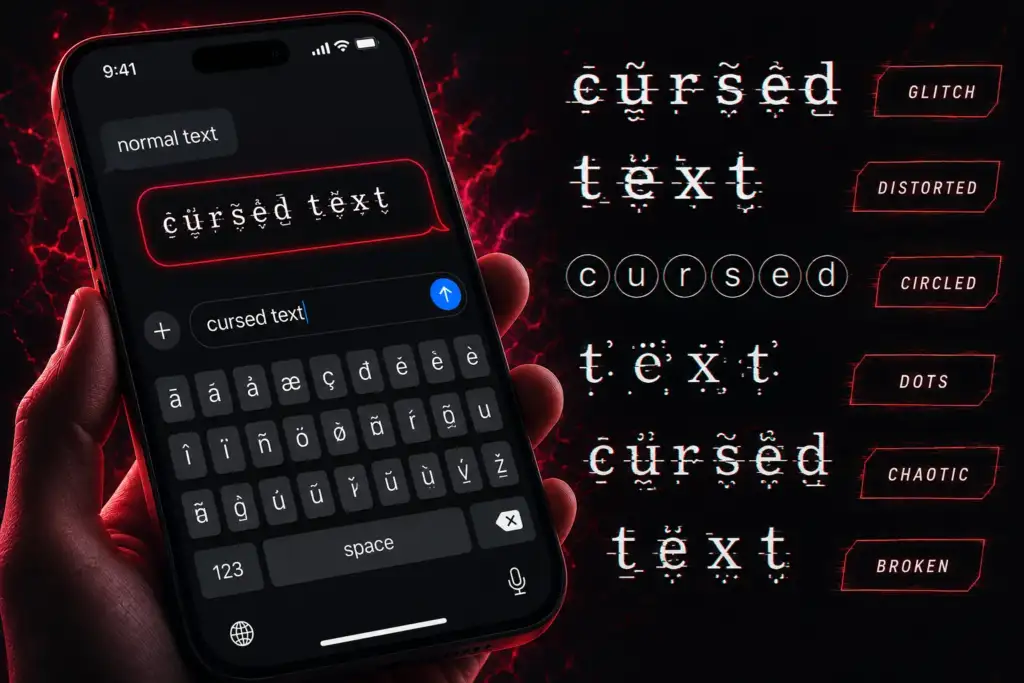
Glitch Text is the lightest style. Letters look digitally corrupted — like a screen glitching or a file that partially failed to load. The text is still readable but clearly broken. This is the go-to style for gaming usernames, Discord display names, and social media bios where you want to stand out without going full chaos mode. If someone in your school or gaming group has a cool-looking username that’s slightly off but still readable — that’s glitch text.

Zalgo Text is at the extreme end. Named after a 2004 internet creepypasta, Zalgo text stacks combining marks so aggressively that letters get buried under layers of symbols dripping above and below every character. At full intensity it barely looks like text at all. It’s designed for horror content, creepypasta stories, SCP roleplay servers, Halloween posts, and anywhere you want maximum visual chaos. This is also called void text in gaming and horror communities — same Unicode technique, different name.

Weird Unicode Text takes a completely different approach. Instead of stacking marks, it swaps standard letters for alternate Unicode characters from exotic script blocks and special character sets. The result looks foreign and otherworldly but stays clean and readable. Perfect for aesthetic Instagram bios, unique TikTok display names, and anywhere you want to look different without going full horror mode.

All three are free. All three work on every platform. Pick your vibe and go.

How to Type Cursed Text on iPhone — Step by Step

No app download needed. This works on every iPhone running iOS 15 and above — which is basically every iPhone in use in the US right now.

Step 1 — Open Safari or Chrome on your iPhone and go to Cursed Text Creater.

Step 2 — Tap the input box at the top of the page. Your iPhone keyboard pops up normally — this is the only keyboard you need.

Step 3 — Type whatever text you want to convert. Your name, a username, a bio line, a message — anything.

Step 4 — Choose your style. Tap Glitch Text for subtle distortion, Zalgo Text for maximum chaos, or Weird Unicode for the exotic clean look.

Step 5 — Watch your cursed text appear in real time below the input. No loading screen. No submit button. It generates as you type.

Step 6 — Tap the Copy button next to your chosen style.

Step 7 — Switch to whatever app you want — iMessage, Discord, Instagram, TikTok, Snapchat, WhatsApp — long press the text field and tap Paste.

Done. Your cursed text is in the app and ready to send or post.

Pro tip for iPhone users: Add cursed text creater to your home screen so it’s one tap away. Open the site in Safari, tap the Share button at the bottom, then tap “Add to Home Screen.” Now it sits on your home screen like an app — no download, no storage used, instant access whenever you need it.

How to Type Cursed Text on Android — Step by Step

Works on every Android phone — Samsung, Google Pixel, OnePlus, Motorola, whatever you’re running.

Step 1 — Open Chrome on your Android and go to Cursed Text Creater.

Step 2 — Tap the input box. Your normal Android keyboard opens — no changes needed, no special keyboard required.

Step 3 — Type your text. Username, bio, message, caption — anything you want distorted.

Step 4 — Select your style. Glitch, Zalgo, or Weird Unicode — the output updates instantly as you type.

Step 5 — Tap Copy on your chosen style.

Step 6 — Open your app, long press the text field, tap Paste, and send.

Pro tip for Android users: In Chrome, tap the three-dot menu in the top right corner and tap “Add to Home Screen.” Same result as iPhone — one-tap access without taking up any storage space.

How to Type Cursed Text on a Laptop or Desktop

Even faster on a computer because you can type quickly and copy with a keyboard shortcut.

Step 1 — Open any browser and go to Cursed Text Creater.

Step 2 — Click the input box and type your text.

Step 3 — Choose Glitch, Zalgo, or Weird Unicode.

Step 4 — Click the Copy button — or select all the output text and press Ctrl+C on Windows or Cmd+C on Mac.

Step 5 — Switch to Discord, your browser, your game, or wherever you’re pasting and hit Ctrl+V or Cmd+V.

That’s it. On a laptop the whole process takes about five seconds.

Where to Use Your Cursed Text — Every Platform That Works in 2026

Once you’ve copied your cursed text on your iPhone or Android, here’s everywhere it works right now for US users:

Discord — Usernames, bios, server names, channel names, status, and chat messages. Discord is the most cursed-text-friendly platform out there. Both light glitch and heavy Zalgo render perfectly. For a full Discord-specific guide check out our Zalgo text for Discord copy paste guide.

iMessage — Group chats and individual messages. Send a cursed iMessage to your group chat and watch the reactions come instantly. One of the most popular uses among US teen users right now.

TikTok — Display name and bio. Weird Unicode and glitch text work especially well on TikTok’s interface. Horror content creators and dark aesthetic accounts use cursed text as part of their permanent branding.

Instagram — Bio and DMs. Medium intensity glitch text in an Instagram bio looks intentional and artistic. Heavy Zalgo in DMs gets reactions every single time.

Snapchat — Display name and chat messages. Light to medium intensity works best on Snapchat’s interface.

WhatsApp — Individual chats, group chats, group names, and status. Full Unicode support across iOS and Android versions of WhatsApp.

Roblox — Usernames and profile bios. Light intensity glitch text works in Roblox usernames. Bios have more flexibility for heavier distortion. Read our full glitch text generator for Roblox guide for everything platform-specific.

Twitter / X — Display names, bios, and tweets. Heavy Zalgo tweets are a staple of surreal memes and dark humor culture on X.

Reddit — Comments, post titles, and community posts in horror, SCP, creepypasta, and dark humor subreddits.

Gaming platforms — Steam names, Fortnite display names, Minecraft signs. Glitch text gaming usernames are massive in the US gaming community right now.

Cursed Text Styles for Specific Situations — What to Use When

Not sure which style fits your situation? Here’s a quick reference based on how US users are using cursed text right now:

For a gaming username — Use Glitch Text at low to medium intensity. You want people to be able to read your name in a lobby while still looking noticeably different from everyone else.

For a Discord bio or TikTok bio — Use Zalgo Text at medium intensity. Bios have more space so the effect has room to breathe. Goes hard without making the whole thing unreadable.

For an iMessage group chat prank — Use Zalgo Text at full intensity. The more chaotic the better. “I am fine everything is fine” in maximum Zalgo hits different every single time.

For an Instagram or Twitter bio — Use Weird Unicode Text. Clean, readable, looks exotic and intentional. Sets you apart without scaring anyone.

For horror content or creepypasta — Use Zalgo Text at maximum intensity. This is what the style was built for. It belongs in this space completely.

For a Roblox or Steam username — Use Glitch Text at light intensity. Platform filters are more restrictive on usernames — keep it subtle and test before committing.

Why Cursed Text Looks So Different From Normal Fonts

A lot of US users ask this — if it’s just Unicode, why does it look so much more extreme than just switching fonts?

Regular fonts are designed to look clean and readable. They use characters that fit neatly inside their standard line boundaries — the invisible box that every letter sits in.

Cursed text breaks those boundaries deliberately. Unicode combining marks are designed to attach to letters — they have no independent width and no standard line limits. When you stack dozens of them on a single letter they overflow both above and below the normal line boundaries. The letter visually bleeds into the lines above and below it.

No font does that. No keyboard shortcut does that. Only Unicode combining characters create that specific broken overflow effect — which is why cursed text looks like nothing else you’ve ever typed normally.

Want to understand the full science behind how this works? Read our complete guide to cursed text, glitch and Zalgo Unicode.

Start Typing Cursed Text on Your Phone Right Now

You don’t need a cursed keyboard. You don’t need a special app. You don’t need to download anything or create an account anywhere.

Open your browser. Go to the cursed text creater. Type anything. Pick your style. Tap Copy. Paste it wherever you want.

Use our free cursed writing generator — works perfectly on iPhone, Android, and every desktop browser. No sign-up. No limits. Instant cursed text on any device.

Your normal keyboard is already everything you need. The chaos is one copy-paste away.

Frequently Asked Questions

Is there a cursed keyboard app for iPhone? 

There is no official cursed keyboard app needed — and most third-party keyboard apps that claim to create cursed text are unnecessary. The fastest and most reliable method for iPhone users is to use a free browser-based cursed text generator like cursed text creater. Open Safari, type your text, copy the output, and paste it anywhere. No download, no subscription, no sign-up required.

Is there a cursed keyboard for Android? 

Same answer as iPhone — you don’t need one. Open Chrome on any Android device, go to cursed text creater, generate your cursed text, and copy-paste it into any app. Works on every Android version and every Android phone brand available in the US.

Can I type cursed text without copy pasting? 

Not practically. Cursed text requires Unicode combining diacritical marks that cannot be typed directly from any standard keyboard — iPhone, Android, or physical. A generator is the only practical way to create it. The copy-paste process takes about five seconds so it’s not a real limitation.

What is the best free cursed text generator for mobile? 

cursed text creater is fully optimized for mobile use on both iPhone and Android. The interface works smoothly on small screens, the copy button works with a single tap, and the output generates in real time without any loading delays. No account needed, no usage limits, completely free.

Does cursed text work on all iPhone models? 

Yes. Cursed text uses standard Unicode which is supported by every iPhone model and iOS version currently in use in the US. Whether you have an iPhone 12 or the latest model, cursed text copies and pastes correctly across all apps.

Will cursed text work when I paste it into games? 

It depends on the game and where you’re pasting. Most gaming platforms that support Unicode in usernames or bios — including Roblox, Steam, and Minecraft — support at least light intensity glitch text. Very heavy Zalgo may be filtered in username fields on some platforms. Test light intensity first and go heavier from there.

Leave a Comment

Your email address will not be published. Required fields are marked *