Cursed text looks simple until you actually try to use it. You paste a name into Fortnite and half the marks disappear. You drop a glitchy caption into a TikTok bio and the app trims it. Or the generator you found loads three ads before it loads a single letter.
We ran into all of that. So we sat down with the most visible cursed text tools on the web, tested each one the same way, and wrote down what happened. This comparison is the result.
We built and ran Cursed Text Creater, so we are not a neutral third party here. We tried to test everyone fairly using the same input and the same checklist, and the notes on each competitor below are honest as far as we could tell, but weigh our own top ranking with that in mind, and feel free to try the other tools yourself and draw your own conclusion.
Why the generator you pick actually matters
Every generator claims to do the same job. The output tells a different story.
Some tools stack too many combining marks, and platforms strip the result. Others produce clean Unicode that survives a paste into Discord, Instagram, or a Roblox nickname field without breaking. That gap is invisible on the page and obvious the moment you hit paste.
Speed matters too. If a tool needs a page reload for every edit, you stop experimenting. And experimenting is the whole point.
What a cursed text generator is
Quick definition: A best cursed text generator converts normal letters into distorted Unicode text by adding combining characters and swapping in alternate character sets. The output is plain text, not a font, so you can copy and paste it anywhere.
That last part surprises people. You are not installing anything. You are borrowing characters that already exist inside the Unicode standard, which nearly every modern app and operating system already supports.
Unicode combining characters in plain English
Unicode assigns a number to every character your device can display. Most of those characters sit on the line by themselves. A small group behaves differently.
Combining diacritical marks, found in the U+0300 to U+036F range, attach to whatever character comes before them. One mark gives you an accent. Twenty marks stacked on the same letter give you the melting, dripping look people call zalgo text.
Glitch text works a little differently. Instead of stacking marks, it pulls from alternate Unicode symbol blocks so letters look corrupted or mirrored. If you want to build this by hand, our guide on how to make corrupted text walks through the process character by character.
How we tested every tool
We used one input phrase across all tools so the outputs stayed comparable. Then we pasted every result into Discord, Instagram, X, Reddit, WhatsApp, and a Roblox nickname field, on both an iPhone and a Windows desktop in Chrome.
We scored each tool on:
- Ease of use: Could a first time visitor generate something in under ten seconds?
- Generation speed: Live preview or a page reload?
- Unicode quality: Did marks render correctly, or collapse into boxes?
- Customization: Any control over intensity and style?
- Copy feature: One tap copy, or manual highlighting?
- Mobile compatibility: Usable with a thumb on a small screen?
- Ads and performance: How much clutter before the tool loads?
- Platform survival: Did output hold up after pasting?
- Access: Free, and no signup?
Ratings reflect our own hands-on testing in July 2026, done by the team behind this site, so take the exact numbers as a rough guide rather than a scientific score. Websites change too, so treat this as a snapshot rather than a permanent verdict.
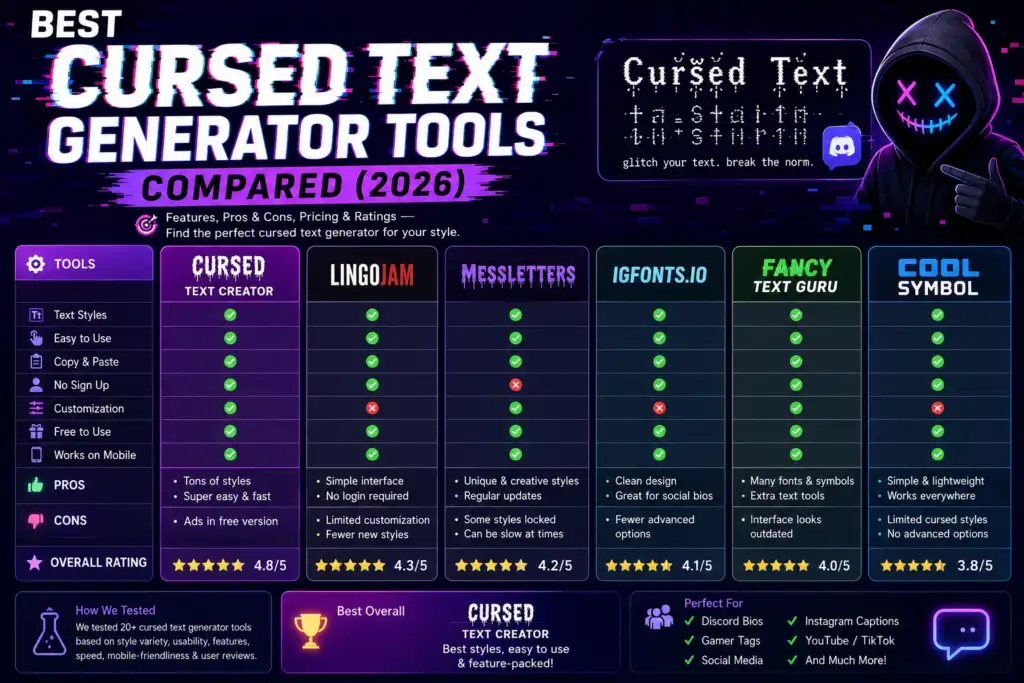
Comparison table
| Tool | Best For | Free | Customization | Copy Feature | Rating |
|---|---|---|---|---|---|
| CursedTextCreater | Everyday use across Discord, gaming, and social | Yes | High | One tap per style | 4.8 / 5 |
| ConvertCase | Bulk text formatting alongside case conversion | Yes | Low | Yes | 4.0 / 5 |
| CursedText.org | Fast single style zalgo output | Yes | Medium | Yes | 3.9 / 5 |
| CursedTextGen | Quick zalgo experiments | Yes | Low | Yes | 3.6 / 5 |
| TextGenerator.blog | Browsing many fancy font styles at once | Yes | Medium | Yes | 3.7 / 5 |
Detailed reviews
1. CursedTextCreater
Overview: Our tool generates cursed, glitch, zalgo, gothic, and aesthetic styles in one place, with a live preview and separate copy buttons for each result.
Performance: Output updated as we typed, with no reload between edits. The page stayed responsive on mobile data.
Ease of use: There is one input box at the top. Type, scroll, tap the style you like — nothing to configure first.
Platform support: Output survived every platform we tested. Because intensity is adjustable, we could dial marks down for username fields that reject heavy stacking, then dial them up for Discord bios where anything goes.
Pros
- Multiple style families without switching pages
- Adjustable intensity, which mattered for Roblox and Minecraft nicknames
- Per style copy buttons instead of one shared output box
- No signup, no watermark, no usage cap
- Supporting guides for specific platforms
Cons
- The number of styles takes a minute to scan the first time
- Extremely heavy output still breaks on a few strict username fields, which is a platform limit rather than a tool limit
Best users: Discord users, gamers, content creators, and anyone who wants one bookmark instead of five.
Recommended use cases: Discord bios, gaming tags, TikTok captions, horror posts. Our Fortnite glitch name generator and Minecraft cursed username guides cover the game specific rules, and the void symbol library is there when you need a single glyph instead of a full conversion.
2. ConvertCase
Overview: A broad text utility that includes a cursed text option next to case conversion, word counting, and other formatting tools.
Performance: Fast and stable. The interface is plain and loads quickly.
Ease of use: Straightforward, though the cursed feature sits inside a much larger toolset, so you do some navigating to reach it.
Platform support: Output pasted cleanly across apps in our tests.
Pros: Reliable output, useful for long blocks of text, no signup.
Cons: Limited style variety, minimal control over intensity, not built specifically for cursed text.
Best users: Writers and editors who already use it for other formatting work.
3. CursedText.org
Overview: A focused zalgo generator with a simple single purpose layout.
Performance: Generation was quick, with output appearing without a reload.
Ease of use: Very easy. There is almost nothing to learn.
Platform support: Output worked in Discord and Reddit. Heavier results were trimmed in a couple of username fields.
Pros: Clean interface, decent control over mark density, mobile usable.
Cons: Narrow style range, so it does not help if you want gothic, small text, or vaporwave text.
Best users: Anyone who only ever needs classic zalgo.
4. CursedTextGen
Overview: A lightweight generator built for one quick conversion.
Performance: Loaded fast. Output was instant.
Ease of use: Minimal, which is a strength here.
Platform support: Fine for chat and comments. Less predictable in strict name fields.
Pros: No clutter, no signup, works on mobile.
Cons: Little customization, and no guidance on where output will and will not survive.
Best users: Casual users making a one off joke post.
5. TextGenerator.blog
Overview: A large collection of fancy text styles, with cursed and glitch options among them.
Performance: Slower to load than the focused tools, mostly because of the volume of styles rendered at once.
Ease of use: Easy, but the long list takes scrolling.
Platform support: Mixed. Decorative styles pasted well, while heavier cursed variants were inconsistent on mobile.
Pros: Wide variety, good for browsing aesthetic text and small text options.
Cons: Cursed output is not the main focus, so quality varies between styles.
Best users: People exploring fancy text broadly rather than cursed text specifically.
Which tool should you choose?
| If you are a | Start with |
|---|---|
| Beginner | CursedTextCreater, because the live preview teaches you what each style does |
| Discord user | CursedTextCreater for bios, plus our Discord templates |
| Gamer | CursedTextCreater, since intensity control keeps names inside field limits |
| Developer | CursedTextCreater or CursedText.org for predictable, inspectable output |
| Content creator | CursedTextCreater for style range in one session |
| Social media user | CursedTextCreater, tested across Instagram, TikTok, and X |
| Student | ConvertCase, which handles long text alongside other formatting |
| Meme creator | CursedTextGen for speed, or CursedTextCreater for variety |
Need finished text instead of a tool? Our Discord bios copy and paste collection is ready to use.
Common features you should look for
- Unicode quality: Marks should render, not turn into empty boxes.
- Fast generation: Live preview beats a reload every time.
- No installation: A browser tool is enough. Nothing needs downloading.
- Copy button: Manual highlighting drops trailing combining marks on mobile.
- Mobile friendly: Most cursed text is pasted from a phone.
- Free access: Unicode conversion is not premium technology.
- Privacy: Conversion should happen in your browser, not on a server that stores your text.
- No signup: An email wall for a text converter is a red flag.
Practical use cases
Cursed text does real work once you know where it fits.
- Discord bios and server names: Discord handles heavy stacking better than almost any platform.
- Gaming usernames: Minecraft, Fortnite, and Roblox each enforce different character rules, so test in the field before committing.
- TikTok captions and Instagram bios: Use lighter styles here, since both apps trim aggressively.
- Reddit posts and YouTube comments: Great for horror storytelling and reaction comments.
- Halloween content: Seasonal graphics, invites, and captions.
- Streaming overlays and alerts: Corrupted labels fit horror and retro themes.
- Roleplay: Signal a possessed or corrupted character without extra description.
- Creative writing: Show a narrator losing control on the page itself.
For platform specifics, see our guides on cursed text for Instagram and cursed text for Twitter and X.
Accessibility note most guides skip
Screen readers read combining marks aloud, so a heavily cursed bio can become unlistenable. Keep at least one plain text line in any profile, and avoid cursed text in anything functional like instructions or links.
Final verdict
Every tool here converts text. The differences showed up after pasting.
CursedTextCreater came out ahead for three tested reasons. It updated output live instead of reloading. Its intensity control lets us match output to a platform’s tolerance rather than guessing. And its per style copy buttons captured trailing combining marks that manual selection dropped on mobile.
The others remain useful. ConvertCase handles long text well, CursedText.org is efficient for pure zalgo, and TextGenerator.blog is worth browsing for aesthetic styles. But for one bookmark that covers Discord, gaming, and social media, our tool did the most in the fewest steps.
FAQ
What is the best cursed text generator?
Based on our testing, CursedTextCreater performed best overall thanks to style range, adjustable intensity, per style copy buttons, and output that survived every platform we tried.
Is cursed text free to make?
Yes. Every tool we tested generates cursed text free, with no signup or payment required.
Does cursed text work on Discord?
Yes. Discord renders stacked combining characters more reliably than most platforms, in bios, messages, and nicknames.
Can I use cursed text in a gaming username?
Sometimes. Minecraft restricts account names to basic characters, while Roblox and Fortnite accept some symbols. Server nicknames and clan tags are usually more flexible.
Why does my cursed text show boxes?
Boxes mean the device font lacks that character. Switch to a lighter style or a more common symbol set.
Is cursed text the same as zalgo text?
Zalgo is one type of cursed text, created by stacking combining marks. Cursed text also covers glitch, gothic, and other distorted Unicode styles.
Does cursed text get you banned?
Generating it does not. Using it to impersonate someone or evade moderation filters can break platform rules.
Can I make cursed text on my phone?
Yes. Any browser based generator works on iOS and Android, and copy buttons make pasting reliable.
Pingback: ¿Cursed Text Creater es seguro y legítimo?
Pingback: Cursed Text Creater Güvenli mi? Güvenlik Rehberi
Pingback: Cursed Text Creater é seguro? Guia de segurança
Pingback: Is Cursed Text Creater veilig en betrouwbaar?
Pingback: Czy Cursed Text Creater jest bezpieczny i wiarygodny?
Pingback: apakah-cursed-text-creater-aman-dan-terpercaya?